
Behavioural bot detection for online surveys Deterministic scoring. No AI black box.
Does this survey journey look human or automated?
SurveyShell looks at specific behavioural and technical signals as a respondent moves through a survey, such as mouse, touchscreen, pen and keyboard activity, timing patterns, and signs of browser automation. It uses these signals to show whether the activity looks human or automated, without reading the questions or answers.
- Deterministic scoring (defined, versioned rules) — no AI black box
- Behavioural and technical signals — no survey questions or answers
- Works in the background — no puzzles, no extra tasks
- Real-time scoring as each survey completes — no waiting for fieldwork to end
- Plain-language reasons — not an unexplained score
SurveyShell does not receive the survey-question wording or respondent-answer content.
Defined rules. No AI scoring.
SurveyShell calculates its results with defined, versioned rules, not AI or machine learning. The same approved evidence under the same engine version produces the same outcome.
This makes the scoring consistent and controlled. It does not mean that every result is certain, which is why SurveyShell provides advisory bands and keeps the researcher in control.
Why no AI in the scoring
No AI in the scoring — respondent signals are assessed by SurveyShell's defined rules, not sent to an AI model for a score.
Repeatable within an engine version — no retrained model quietly changing how the same behaviour is assessed.
Defined rules and versioned engines — scoring changes can be reviewed and tested.
Each journey is scored independently — one respondent's result never depends on another respondent's behaviour.
Convincing answers can still come from automation
Bots and AI agents can complete surveys and produce answers that look convincing. Those responses can distort the data because they do not represent a real person in the target audience.
Why it matters
Research helps us learn, get answers and make informed decisions. If survey findings are based on responses that did not come from real people, those findings can point researchers and decision-makers in the wrong direction.
The cost is not only the time and money spent on the research. It is also the time, money and effort spent acting on the wrong conclusion.
Add. Observe. Review.
Your survey programmer pastes a small snippet into the survey template, and SurveyShell runs quietly in the background from then on.
The snippet observes interaction, reduces it to approved summaries in the browser, and sends only those to SurveyShell. Results come back into your survey data automatically as each respondent finishes.
Add SurveyShell
After setup and testing, a small SurveyShell code block is added to a compatible survey template or theme. The same integration can then be reused across future studies on that template. Each journey uses a unique SurveyShell access code, so SurveyShell only accepts data from authorised journeys.
Observe the journey
SurveyShell works in the background, examining interaction patterns and signs of browser automation as respondents move through the survey. It does not read the questions or answers or add extra tasks.
Review the results
Results can be included in the client's survey data as the survey is completed. Researchers review the detail in the SurveyShell dashboard, export the results and decide which responses to keep, review or remove.
Signals across the survey journey
SurveyShell considers different observations together across the journey. No individual movement, click, fast page or browser check proves that a survey was automated.
Movement and interaction
Summaries of mouse, touchscreen and pen activity, click placement, scrolling and movement across survey pages.
Timing across the journey
Patterns in time spent on each page, first activity, idle periods and tab visibility across the journey.
Typing and text entry
Summaries such as typing rhythm, corrections and paste activity, never the words that were typed or pasted.
Browser automation and technical consistency
Signs of browser automation, browser-event trust, viewport context and contradictory or malformed activity data.
One focused question
SurveyShell focuses on Human Likelihood: does the way this survey was completed look human or automated?
It assesses specific evidence from across the survey journey. Researchers receive a clear result and supporting observations, while keeping control of the final decision.
Three simple results
When there is enough usable evidence for a normal assessment, SurveyShell provides one of three Human Likelihood bands. It does not force a result when that assessment cannot be made.
SurveyShell does not automatically reject a respondent. Researchers decide how to use the result.
The bands describe the recorded interaction, not the person. Automation-consistent interaction can sometimes come from a human using assistive tools such as voice control, which is why researchers review results rather than act on them automatically.
The recorded interaction pattern is consistent with typical human survey-taking.
The recorded interaction pattern is mixed and should be considered alongside the research team's other checks.
The recorded interaction pattern is not consistent with typical human survey-taking.
Each journey's result and supporting observations are shown in the SurveyShell dashboard. Below is an illustrative view with example data.
- Browser automation flag detected
- High exact-centre click share
- Highly regular typing rhythm
Additional feature
An additional view of quality
When enabled for a study, SurveyShell can also highlight repeated pace and text-entry or paste patterns that may deserve review. This result remains separate from Human Likelihood and does not judge the meaning or accuracy of an answer.
Built for research teams
Built for online surveys
Fieldwork decisions happen by study and by respondent — evidence should too.
Across the survey journey
SurveyShell looks at patterns across survey pages rather than treating one isolated action as proof.
Reusable setup
After configuration and testing, a small integration can be reused across compatible studies and templates.
Results in the survey data
The Human Likelihood band, and the Quality band when enabled, can be returned in real time to the client's survey record, for example into hidden survey questions, as the survey is completed.
Results researchers can use
A score no one can explain cannot defend a fieldwork decision.
Three clear Human Likelihood bands
Likely human, Needs review and Unlikely human provide a simple advisory view.
Results you can understand
The dashboard describes relevant observations in plain language and provides more detail when needed.
Researchers remain in control
SurveyShell does not automatically reject a respondent. The client decides what to keep, review or remove.
Designed around privacy and the survey experience
Protection designed around respondent privacy and survey continuity.
How it was completed—not what was asked and answered
SurveyShell does not receive the survey-question wording or respondent-answer content.
Limited data by design
Behavioural signals are reduced to clearly defined summaries before they are sent to SurveyShell. Raw pointer paths and typed text are not transmitted.
Authorised journeys only
Each journey uses a unique SurveyShell access code. No behavioural summary is sent to or stored by SurveyShell unless the journey is authorised.
No puzzles. No extra tasks.
- SurveyShell works in the background while respondents complete the same survey.
- SurveyShell adds no extra questions, puzzles or tasks.
- If SurveyShell is ever unavailable, the survey simply continues.
Privacy and regional control by design
SurveyShell collects limited behavioural and technical summaries without receiving survey questions or answers. Its architecture uses a private, encrypted database, limited operational logging and defined retention controls. Each client's data is isolated in its own dedicated schema, with a fully separate database available as an option where a client requires it.
SurveyShell works from
- limited summaries of timing and pace;
- movement, interaction and click-placement summaries;
- typing counts, rhythm and paste activity, never the words; and
- limited browser-automation and technical-consistency checks.
SurveyShell does not receive or retain
- survey-question wording, selected answers or open-ended response content;
- the words typed or pasted;
- raw pointer paths or coordinate streams; or
- broad device fingerprints or cross-site respondent histories.
On survey pages, SurveyShell briefly stores its access code and the minimum details needed to tie that code to the correct journey in the current tab's session storage. These details are removed automatically. The respondent-side SDK uses no cookies and no local storage.
The Australian pilot stores respondent scoring data in AWS Sydney. For future client deployments, regional AWS hosting can be assessed and agreed during onboarding, subject to technical, legal and commercial requirements.
Research quality has more than one layer
Reliable survey data depends on several different checks, and every research team layers them differently; some use more, some fewer. This is how SurveyShell thinks about three that matter in most studies: Human Likelihood, respondent identity and response quality answer different questions and work best when their roles are clear.
Human Likelihood
Does the survey journey look human or automated?
If a response did not come from a real person, it does not represent anyone.
Identity and profile
Is the respondent eligible and who they claim to be?
If it came from the wrong person, it does not represent your target audience.
Response Quality
Does the way the response was completed show anything that needs review?
If it was completed carelessly, it cannot support reliable findings.
All three affect what the research concludes — a weakness in any layer weakens the findings.
These are separate checks, not one combined score and not a guaranteed sequence.
Strong separation in controlled testing
These were repeated controlled test journeys, not 404 unique people or systems, and they do not establish a real-world accuracy rate. A separate in-house test also shows how SurveyShell assessed 208 journeys run through Indralo-built automation. Live validation across varied fieldwork is the next step.
Read the results and limitations| Controlled test journey | Likely human | Needs review | Unlikely human | Total |
|---|---|---|---|---|
| Human-operated | 202 | 1 | 0 | 203 |
| AI-agent-operated | 0 | 0 | 201 | 201 |
| Total | 202 | 1 | 201 | 404 |
Almost every human-operated journey was classified Likely human: 202 of 203.
Every AI-agent-operated journey was classified Unlikely human: 201 of 201.
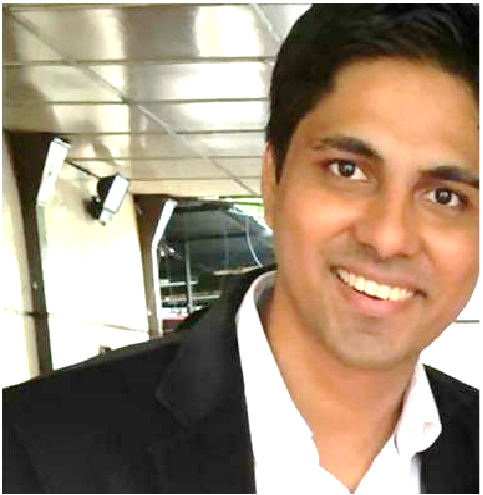
Built from nearly two decades in research
I'm Ravindra Lohot (you can call me Ravi), founder of Indralo and creator of SurveyShell. I've spent nearly two decades inside market research, across survey programming, panel, operations, platforms and products, sales, and custom quantitative research, with roles at YouGov, Kantar Profiles (ORU), Dynata, Nielsen, Voxco and Ugam.
In every one of those roles, automated survey activity was someone's problem, and its cost never stopped at the fieldwork budget. It followed the data into the findings, and into the decisions built on them. I started building SurveyShell in January 2026 so researchers could see, clearly and without reading a single answer, whether a survey journey looks human or automated.
I got into research almost by accident (like most people in this industry) and stayed because I loved it; few industries would have let me wear this many hats. Born and raised in Mumbai, I've called Sydney home for around a decade now. Away from work, you'll find me cooking, watching good sci-fi, or out on a long walk with a good coffee.
Want to discuss SurveyShell?
Tell us about your survey platform and the bot-fraud problems you are facing. We can discuss your current setup, where SurveyShell may help and what the next step could look like.